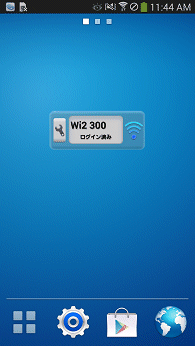
For Android, it works by registering the moopener widget on the home screen.
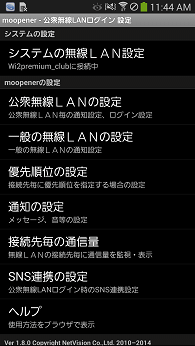
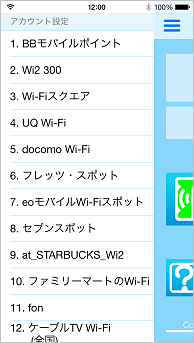
After registering the widget, if you configure the public wireless LAN in the moopener settings, the public wireless LAN network (Wi-Fi) will be automatically registered in the system.
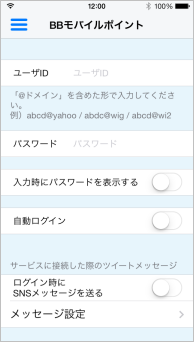
To set up a public wireless LAN, enter your user ID and password. Other items are selectable, so you can set automatic login settings, notification settings, etc. as you like.
In addition to the login function, the SNS linkage function allows you to tweet to Twitter when login is completed.
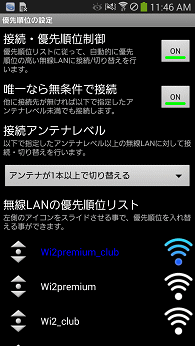
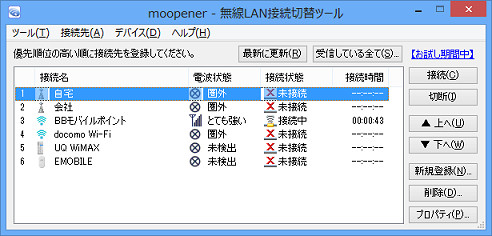
With the connection switching function (priority setting), when receiving multiple wireless LANs, if the wireless LAN with a higher priority than the currently connected wireless LAN reaches a certain reception sensitivity (selected value) or higher, the connection will be switched to the higher priority wireless LAN. Networks (Wi-Fi) registered in the system are automatically added to the priority list when you start the app.
Additionally, it can be customized for businesses.
Customization is just one example, so please inquire about the functions you need.
-
A function to display public wireless LAN access points on a map
-
Ability to search for access points by store, address, etc.
-
Sign-up function to obtain user ID and password from the server
-
Function that operates without registering widgets
|
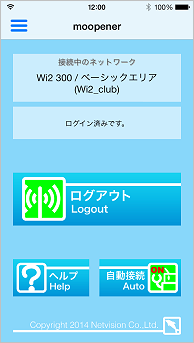
For iOS, when you start the app within a public wireless LAN area, you will be automatically logged in.
In addition to starting the app and logging in, you can set it to log in in the background, so you can log in without opening the moopener app screen even when you are using other apps.
To set up a public wireless LAN, enter your user ID and password and configure the public wireless LAN network (Wi-Fi) on your system.
In addition to the login function, you can use the SNS linkage function to tweet to Twitter when you complete login.
Additionally, it can be customized for businesses.
Customization is just one example, so please inquire about the functions you need.
-
A function to display public wireless LAN access points on a map
-
Ability to search for access points by store, address, etc.
-
Sign-up function to obtain user ID and password from the server
|
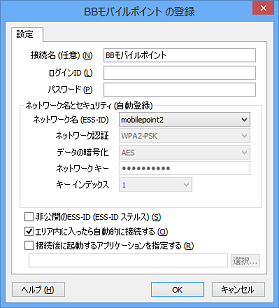
For Windows, it resides in the task tray and monitors wireless LAN/Wi-Fi (including public), 3G/LTE, Bluetooth tethering, and fixed LAN (signal status, connection status) and switches the connection to the optimal network among different networks.
For compatible public wireless LANs, you will be automatically logged in when you connect to the public wireless LAN by registering your login ID and password.
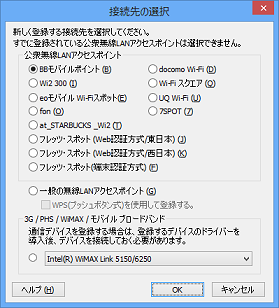
When you start moopener, it automatically imports the wireless LAN access point, 3G/PHS, and mobile WiMAX information registered on your computer, so there is no need to re-enter the information once registered on your computer.
In Windows 7/8/10, you can use WPS (push button type) for general wireless LAN registration.
|
|
●Public wireless LAN login app/tool
|
This is an app/tool that automatically logs in when connected to a compatible public wireless LAN.
This is for iOS4 to iOS6 and MacOS X, which are not supported by moopener.
moopener for iOS4 to iOS6
Similar to iOS, register your public wireless LAN user ID and password in the app, connect to the public wireless LAN's Wi-Fi, and then start the app and you will be automatically logged in. You can also do the same customizations, such as map search and address search functions.
Mac OS
For X, if you start this tool in advance, you will be automatically logged in when connecting to public wireless LAN Wi-Fi. You can choose whether to log in automatically in the settings.
|
iOS : 4.3 ~ 6.1.6
MacOS X: 10.4 or later
About samples for iOS4 to iOS6/MacOS X
|
Since we only deliver to businesses, we do not have a sample version.
Please contact us for samples and details.
|
BB mobile points |
| docomo Wi-Fi |
| Wi2 300 |
| Wi-Fi Square |
| UQ Wi-Fi |
| FLET'S SPOT (Web authentication method, terminal authentication method) |
| eo mobile Wi-Fi spot |
| Cable TV Wi-Fi (nationwide) |
| Cable Wi-Fi spot (Tokai area) |
| fon |
| at_STARBUCKS_Wi2 |
| seven spot |
| FamilyMart Wi-Fi |
| C-NEXCO Free Wi-Fi |
| E-NEXCO Wi-Fi SPOT |
*This may not be possible depending on the system.
*Please contact us for services not listed above. |
KDDI Corporation |
| Biglobe Co., Ltd. |
| Wireless Gate Co., Ltd. |
| Wire and Wireless Co., Ltd. |
| K-Opticom Co., Ltd. |
| Econect Co., Ltd. |
| NTT Communications Co., Ltd. |
| *In no particular order |
Connection setup tools
Software that we sell directly
moopener for Android
moopener for iOS
●Contact us●
TEL:055-926-3515 FAX:055-926-3516
info-setup@netvision.co.jp
|
 Mobile connection support software