NETVISION / PRODUCTS
Toolbar for Firefox
| Home >
Products >
User setting support software >
toolbar >
Toolbar for Firefox |
 Toolbar for Firefox Toolbar for Firefox |
You can install a sample toolbar for Firefox from the link below.
This toolbar is
for IEIt has the same functionality.
●
Install the toolbar
[Installation method]
- Click the link above on Firefox.
- Depending on your Firefox settings, a message may appear at the top of the page. Click Change settings... on the right side of the bar.

*This message will not be displayed if [Warn if a website tries to install an extension or theme] in [Tools] → [Options...] → [Content] is unchecked, or if [netvgw2.netvision.co.jp] is already registered in [Exception sites] for this item. Please ignore steps 2, 3, and 4 and proceed with the installation according to the instructions.
- A screen will appear asking you to specify the site where you want to allow software installation. Make sure that [netvgw2.netvision.co.jp] is entered as the site address, and then click [Allow].
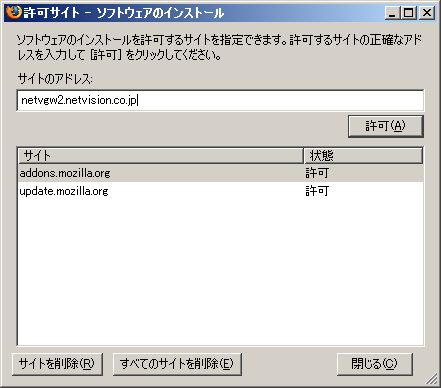
Once the address has been added to the list of sites, click [Close] to close the screen.
- Click the link above again to start the installation. Please follow the instructions to install.
If you are unable to install using the steps above, please try the following method.
- Right-click on the link above and select [Save link as...] from the menu that appears, or click the link above in a browser other than Firefox and save the file to your desktop, etc.
- Drag and drop the downloaded file to Firefox. The installation will now begin.
[How to uninstall]
- Select [Tools] → [Extensions] to display the extensions screen.
- Select [NetVision Toolbar] from the list of extensions and click [Remove].
[Operating environment]
Browser: Mozilla Firefox 1.0 or later (operation confirmed with Firefox up to 2.0)
System: Based on the operating environment of Firefox.
|
BACK
Reference images may show Japanese interface labels. The accompanying instructions are provided in English.